
How to set the Internet
The Nangang Dormitory only provides wired internet in rooms, not Wi-Fi.
Please bring your own network cable (Ethernet cable) to connect your computer to the wall socket on your desk.
If you need Wi-Fi in your room, please purchase your own Wi-Fi router.
Public Wi-Fi provided by the dormitory is only available around the dormitory office on the 5th floor
If you previously lived in the East dormitory, please reset all IP settings on your computer.
All IP settings must be set to "Automatically," and your computer will connect to the internet automatically.
-
Mac
>>系統設定 System Settings
>>網路 Network
>>乙太網路 Ethernet
>>進階 Advanced
>>TCP/IP
>>設定 IPv4 Configure IPv4
>>使用 DHCP 自動分配 Using DHCP Automatically -
Windows
>>網路和網際網路 Network and Internet
>>網路和共用中心 Network and Sharing Center
>>乙太網路 Ethernet
>>變更介面卡設定 Change adapter settings
>>網際網路通訊協定第4版(TCP/IPv4) Internet Protocol Version 4
>>內容 Properties
>>自動取得IP位址、自動取得DNS伺服器位址 Get IP automatically and Get DNS Automatically
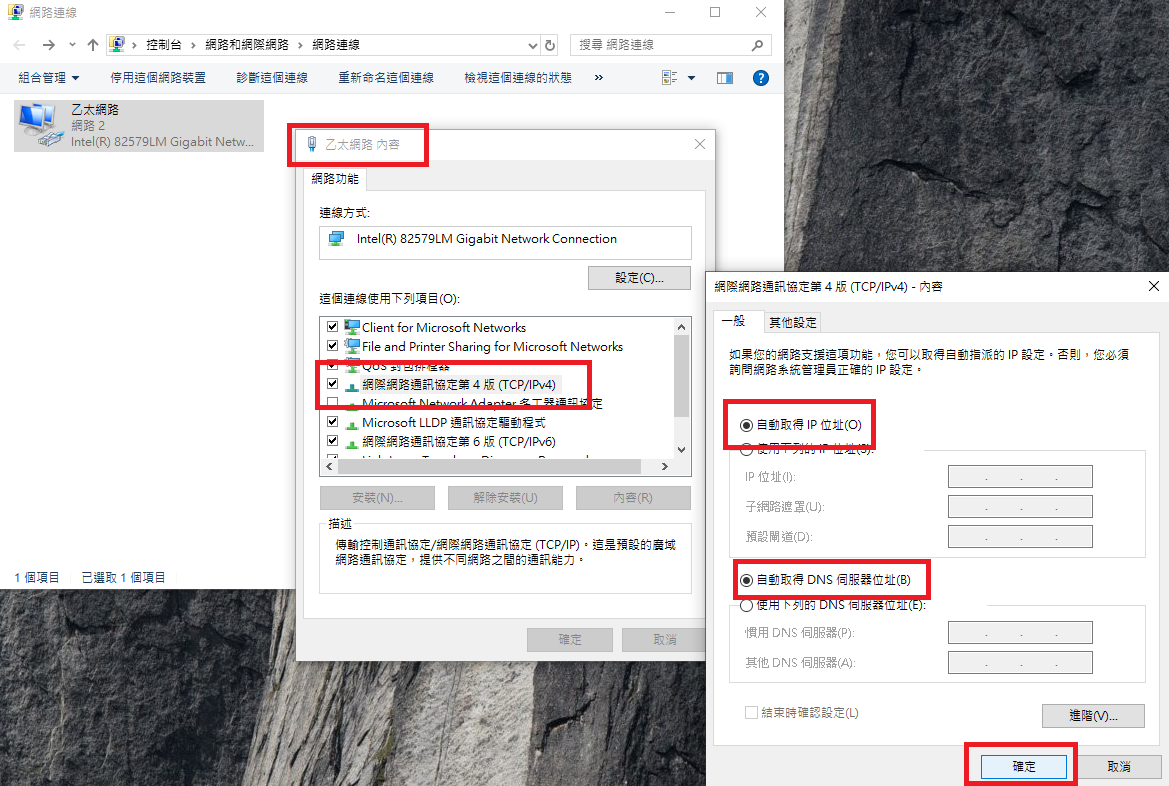
How to configure TCP/IP on Windows?
 南港網路設定方法(學生宿舍網路使用規範 Regulations of Management of Dorm Internet).pdf